This post is a Raspberry Pi 5 edition of our AFSK APRS transmitter and decoder project using the ADALM PlutoSDR. We cover everything from scratch: setting up the operating system, installing all dependencies including libiio, SoapySDR and pyadi-iio, connecting the PlutoSDR over USB, and running the full Python transmitter and decoder pipeline.
What is APRS?
APRS (Automatic Packet Reporting System) is a digital communications protocol used in amateur radio. It transmits short packets containing position reports, messages, weather data, and more. It uses AFSK modulation (Audio Frequency Shift Keying) at 1200 baud, with:
- Mark frequency: 1200 Hz (represents bit 1)
- Space frequency: 2200 Hz (represents bit 0)
- Carrier frequency: 144.800 MHz in Europe, 144.390 MHz in North America
The underlying framing protocol is AX.25, which handles callsigns, addressing, CRC error checking, NRZI encoding, and bit stuffing.
Hardware Requirements
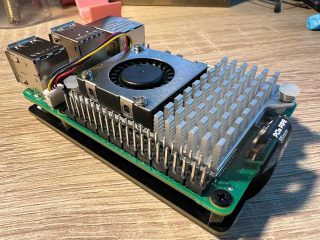
- Raspberry Pi 5 (4 GB or 8 GB recommended)
- MicroSD card, 16 GB or larger, with Raspberry Pi OS (64-bit, Trixie)
- Better, you might consider a NVMe unit via PCIe (Raspberry Pi 5 supports that)
- ADALM PlutoSDR
- A data-capable USB cable (not a charge-only cable)
- A 2-meter amateur radio antenna connected to the PlutoSDR TX port
- An amateur radio licence to transmit on 144 MHz
- Internet connection for package installation
Part 1: Raspberry Pi OS Setup
Flash the OS
Download and install the Raspberry Pi Imager from raspberrypi.com. Flash Raspberry Pi OS Lite 64-bit or Raspberry Pi OS Desktop 64-bit to your microSD card. Enable SSH and set your username and password in the imager’s advanced settings before flashing.
First Boot and System Update
sudo apt update && sudo apt full-upgrade -y
sudo reboot
Install Essential Build Tools
sudo apt install -y \
    build-essential \
    cmake \
    git \
    wget \
    curl \
    pkg-config \
    libusb-1.0-0-dev \
    libxml2-dev \
    libavahi-client-dev \
    bison \
    flex \
    python3 \
    python3-pip \
    python3-venv \
    python3-dev \
    libpython3-dev \
    usbutils \
    net-tools \
    iputils-ping
Part 2: Install libiio (Analog Devices IIO Library)
libiio is the low-level C library that talks directly to the PlutoSDR hardware. It must be built from source on the Raspberry Pi to get the latest version.
Clone and Build libiio
cd ~
git clone https://github.com/analogdevicesinc/libiio.git
cd libiio
mkdir build && cd build

cmake \
    -DCMAKE_BUILD_TYPE=Release \
    -DPYTHON_BINDINGS=ON \
    -DWITH_TESTS=ON \
    -DWITH_EXAMPLES=ON \
    -DENABLE_DNS_SD=ON \
    ..

make -j4
sudo make install
sudo ldconfig
Verify libiio Installation
iio_info –version
You should see output similar to:
libiio version: 0.25 (git tag: v0.25)
Compiled with backends: local xml ip usb serial
Part 3: Install libad9361 (PlutoSDR Filter Library)
This library provides the AD9361 RF chip calibration and filter routines used by the PlutoSDR.
cd ~
git clone https://github.com/analogdevicesinc/libad9361-iio.git
cd libad9361-iio
mkdir build && cd build
cmake -DCMAKE_BUILD_TYPE=Release ..
make -j4
sudo make install
sudo ldconfig
Part 4: Install SoapySDR
SoapySDR is a vendor-neutral SDR hardware abstraction layer. It allows many different SDR applications to talk to many different hardware devices through a single unified API. Installing it makes the PlutoSDR accessible to GNU Radio, SDR++, CubicSDR, and any other SoapySDR-compatible application.
Install SoapySDR Core
cd ~
git clone https://github.com/pothosware/SoapySDR.git
cd SoapySDR
mkdir build && cd build

cmake \
    -DCMAKE_BUILD_TYPE=Release \
    -DPYTHON3_EXECUTABLE=$(which python3) \
    ..

make -j4
sudo make install
sudo ldconfig
Verify SoapySDR
SoapySDRUtil –info

######################################################
##     Soapy SDR — the SDR abstraction library     ##
######################################################

Lib Version: v0.8.1-g19a8a9b6
API Version: v0.8.0
ABI Version: v0.8
Install root: /usr/local
Search path:  /usr/local/lib/SoapySDR/modules0.8
No modules found!
No modules found is expected at this stage. The PlutoSDR module is installed next.
Install SoapyPlutoSDR Module
cd ~
git clone https://github.com/pothosware/SoapyPlutoSDR.git
cd SoapyPlutoSDR
mkdir build && cd build

cmake \
    -DCMAKE_BUILD_TYPE=Release \
    ..

make -j4
sudo make install
sudo ldconfig
Verify PlutoSDR is Found by SoapySDR
Plug in the PlutoSDR via USB, wait 10 seconds, then run:
SoapySDRUtil –find=”driver=plutosdr”

######################################################
##     Soapy SDR — the SDR abstraction library     ##
######################################################

Found device 0
  addr = ip:192.168.2.1
  driver = plutosdr
  label = PlutoSDR USB [ip:192.168.2.1]
  media = USB 2.0
  module = SoapyPlutoSDR
  serial = 10447355…
Part 5: Connect the PlutoSDR on Raspberry Pi
Verify USB Detection
lsusb
Look for a line like:
Bus 001 Device 003: ID 0456:b673 Analog Devices, Inc. PlutoSDR
Check the USB Network Interface
The PlutoSDR creates a virtual USB network adapter using the CDC-ECM driver, which Raspberry Pi OS supports natively. No driver installation is needed.
ip addr show
Look for an interface (typically usb0 or enx*) with the address 192.168.2.10 assigned automatically, or assign it manually:
# Check which interface appeared after plugging in
ip link show

# If no IP was assigned automatically, set one manually
sudo ip addr add 192.168.2.10/24 dev usb0
sudo ip link set usb0 up

# Verify
ping -c 4 192.168.2.1
PING 192.168.2.1 (192.168.2.1) 56(84) bytes of data.
64 bytes from 192.168.2.1: icmp_seq=1 ttl=64 time=0.452 ms
64 bytes from 192.168.2.1: icmp_seq=2 ttl=64 time=0.398 ms
Make the IP Assignment Permanent
To avoid having to reassign the IP every reboot, create a systemd-networkd config file:
sudo nano /etc/systemd/network/pluto.network
Add the following content:
[Match]
MACAddress=00:e0:22:fe:da:c9

[Network]
Address=192.168.2.10/24
Replace the MAC address with the one shown by ip link show for your PlutoSDR interface. Then enable networkd:
sudo systemctl enable systemd-networkd
sudo systemctl restart systemd-networkd
Alternatively, add a udev rule to always name the interface pluto0:
sudo nano /etc/udev/rules.d/99-plutosdr.rules
SUBSYSTEM==”net”, ATTRS{idVendor}==”0456″, ATTRS{idProduct}==”b673″, NAME=”pluto0″
sudo udevadm control –reload-rules
sudo udevadm trigger
Test libiio Connection to PlutoSDR
iio_info -u ip:192.168.2.1
You should see several pages of output listing all IIO devices and channels on the AD9363 chip. If this works, the hardware layer is fully operational.
Part 6: Set Up Python Virtual Environment
Always use a virtual environment on Raspberry Pi OS Trixie to avoid conflicts with system Python packages.
cd ~
mkdir aprs_pluto && cd aprs_pluto
python3 -m venv venv
source venv/bin/activate
Install Python Dependencies
pip install –upgrade pip
pip install numpy scipy
Install pyadi-iio
pyadi-iio is Analog Devices’ official Python interface for the PlutoSDR. It wraps libiio with a clean, high-level API.
pip install pyadi-iio
If pip installation fails, build from source:
cd ~
git clone https://github.com/analogdevicesinc/pyadi-iio.git
cd pyadi-iio
pip install .
cd ~/aprs_pluto
source venv/bin/activate
Install SoapySDR Python Bindings
pip install SoapySDR
If the pip package does not match your compiled SoapySDR version, install the Python bindings from the source build instead:
cd ~/SoapySDR/build
sudo make install
# The Python bindings are installed system-wide by cmake.
# Copy them into the venv site-packages:
cp -r /usr/local/lib/python3.*/dist-packages/SoapySDR* \
      ~/aprs_pluto/venv/lib/python3.*/site-packages/
Quick Connection Test
#!/usr/bin/env python3
# Save as test_pluto.py and run: python3 test_pluto.py

import adi

candidates = ['ip:192.168.2.1', 'ip:pluto.local', 'usb:0']

for uri in candidates:
    try:
        sdr = adi.Pluto(uri=uri)
        print(f'Connected via {uri}')
        print(f'   Sample rate:  {sdr.sample_rate} Hz')
        print(f'   TX LO:        {sdr.tx_lo} Hz')
        print(f'   RX LO:        {sdr.rx_lo} Hz')
        del sdr
        break
    except Exception as e:
        print(f'Failed {uri}: {e}')
python3 test_pluto.py

Connected via ip:192.168.2.1
   Sample rate:  575999 Hz
   TX LO:        2399999998 Hz
   RX LO:        2399999998 Hz
The small frequency rounding differences (575,999 instead of 576,000, etc.) are normal. The AD9363 PLL cannot hit exact values and rounds to the nearest achievable clock. This has no practical effect on APRS operation.
Part 7: Optional — Install GNU Radio with PlutoSDR Support
If you want a graphical signal analyser and flowgraph environment alongside the Python scripts, install GNU Radio and its PlutoSDR sink and source blocks.
sudo apt install -y gnuradio
pip install gnuradio-companion

# Install gr-iio (PlutoSDR blocks for GNU Radio)
cd ~
git clone https://github.com/analogdevicesinc/gr-iio.git
cd gr-iio
mkdir build && cd build
cmake -DCMAKE_BUILD_TYPE=Release ..
make -j4
sudo make install
sudo ldconfig
Part 8: APRS Transmitter
How the Transmitter Works
- Build an AX.25 UI frame with callsign encoding, CRC-16, and bit stuffing
- Apply NRZI encoding
- Modulate using AFSK at 48 kHz internally
- Upsample to 576 kHz to satisfy the pyadi-iio minimum sample rate of 521 kHz
- Transmit as complex IQ via the PlutoSDR at 144.800 MHz
Transmitter Code
#!/usr/bin/env python3
"""
AFSK APRS Packet Transmitter via ADALM PlutoSDR
Raspberry Pi 5 edition
Requires: pyadi-iio, numpy, scipy
"""

import numpy as np
from scipy.signal import resample_poly
import adi
import time
from math import gcd

# ===================== APRS / AX.25 PARAMETERS =====================
CALLSIGN_SRC = 'NOCALL'
SSID_SRC     = 0
CALLSIGN_DST = 'APRS'
SSID_DST     = 0
APRS_INFO    = '!4807.38N/01131.00E>Test APRS via PlutoSDR /A=000000'

# ===================== SAMPLE RATE PARAMETERS =====================
FS_AUDIO  = 48_000
FS_PLUTO  = 576_000      # 12 x 48000, satisfies >= 521000 minimum

# ===================== AFSK PARAMETERS =====================
MARK_FREQ       = 1200
SPACE_FREQ      = 2200
BAUD_RATE       = 1200
SAMPLES_PER_BIT = FS_AUDIO // BAUD_RATE
FC_TX           = 144_800_000   # 144.800 MHz Europe / 144_390_000 NA
TX_GAIN         = -10           # dB, range -89 to 0

def encode_ax25_addr(callsign, ssid, is_last):
    callsign  = callsign.upper().ljust(6)[:6]
    addr      = [ord(c) << 1 for c in callsign]
    ssid_byte = 0x60 | ((ssid & 0x0F) << 1)
    if is_last:
        ssid_byte |= 0x01
    addr.append(ssid_byte)
    return addr

def compute_crc16(data):
    crc  = 0xFFFF
    poly = 0x8408
    for byte in data:
        crc ^= byte
        for _ in range(8):
            if crc & 0x0001:
                crc = (crc >> 1) ^ poly
            else:
                crc >>= 1
    return crc ^ 0xFFFF

def bytes_to_bits_lsb(data):
    bits = []
    for byte in data:
        for k in range(8):
            bits.append((byte >> k) & 1)
    return bits

def bit_stuff(bits):
    stuffed = []
    count   = 0
    for b in bits:
        stuffed.append(b)
        if b == 1:
            count += 1
            if count == 5:
                stuffed.append(0)
                count = 0
        else:
            count = 0
    return stuffed

def nrzi_encode(bits):
    nrzi    = []
    current = 1
    for b in bits:
        if b == 0:
            current ^= 1
        nrzi.append(current)
    return nrzi

def build_ax25_frame(dst_call, dst_ssid, src_call, src_ssid, info):
    dst_bytes  = encode_ax25_addr(dst_call, dst_ssid, False)
    src_bytes  = encode_ax25_addr(src_call, src_ssid, True)
    control    = [0x03]
    pid        = [0xF0]
    info_bytes = list(info.encode('ascii'))
    frame_data = dst_bytes + src_bytes + control + pid + info_bytes
    crc        = compute_crc16(frame_data)
    full_frame = frame_data + [crc & 0xFF, (crc >> 8) & 0xFF]
    bits = bytes_to_bits_lsb(full_frame)
    bits = bit_stuff(bits)
    return bits

def afsk_modulate(bits, f_mark, f_space, fs, spb):
    spb   = int(round(spb))
    audio = np.zeros(len(bits) * spb, dtype=np.float64)
    phase = 0.0
    t     = np.arange(spb) / fs
    for i, bit in enumerate(bits):
        freq  = f_mark if bit == 1 else f_space
        chunk = np.sin(2 * np.pi * freq * t + phase)
        audio[i*spb:(i+1)*spb] = chunk
        phase = (phase + 2 * np.pi * freq * spb / fs) % (2 * np.pi)
    return audio

def upsample(audio, fs_in, fs_out):
    g    = gcd(fs_out, fs_in)
    up   = fs_out // g
    down = fs_in  // g
    print(f'  Resampling {fs_in} Hz -> {fs_out} Hz  (P={up}, Q={down})')
    return resample_poly(audio, up, down)

def detect_pluto():
    candidates = ['ip:192.168.2.1', 'ip:pluto.local', 'usb:0']
    for uri in candidates:
        try:
            print(f'  Trying {uri} ...', end=' ', flush=True)
            sdr = adi.Pluto(uri=uri)
            print('Connected!')
            return sdr, uri
        except Exception as e:
            print(f'Failed: {e}')
    raise RuntimeError(
        'Could not find PlutoSDR.\n'
        'Check: lsusb | grep 0456\n'
        'Check: ping 192.168.2.1'
    )

def main():
    print('=== AFSK APRS Transmitter - ADALM PlutoSDR / Raspberry Pi 5 ===\n')

    print('Building AX.25 frame...')
    frame_bits = build_ax25_frame(
        CALLSIGN_DST, SSID_DST,
        CALLSIGN_SRC, SSID_SRC,
        APRS_INFO
    )
    nrzi_bits = nrzi_encode(frame_bits)
    print(f'  {len(frame_bits)} bits after stuffing')

    print('Modulating AFSK...')
    flag_bits  = [0,1,1,1,1,1,1,0] * 30
    tail_bits  = [0,1,1,1,1,1,1,0] * 5
    pre_audio  = afsk_modulate(nrzi_encode(flag_bits),  MARK_FREQ, SPACE_FREQ, FS_AUDIO, SAMPLES_PER_BIT)
    main_audio = afsk_modulate(nrzi_bits,                MARK_FREQ, SPACE_FREQ, FS_AUDIO, SAMPLES_PER_BIT)
    tail_audio = afsk_modulate(nrzi_encode(tail_bits),  MARK_FREQ, SPACE_FREQ, FS_AUDIO, SAMPLES_PER_BIT)

    full_audio = np.concatenate([pre_audio, main_audio, tail_audio])
    print(f'  Duration at {FS_AUDIO} Hz: {len(full_audio)/FS_AUDIO:.2f} s')

    full_audio = upsample(full_audio, FS_AUDIO, FS_PLUTO)
    full_audio /= np.max(np.abs(full_audio))

    scale     = 2**14
    iq_signal = (full_audio * scale).astype(np.complex64)
    print(f'  Final samples at {FS_PLUTO} Hz: {len(iq_signal)} ({len(iq_signal)/FS_PLUTO:.2f} s)')

    print('\nSearching for PlutoSDR...')
    sdr, uri = detect_pluto()

    print(f'\nConfiguring TX on {FC_TX/1e6:.3f} MHz...')
    sdr.sample_rate           = int(FS_PLUTO)
    sdr.tx_lo                 = int(FC_TX)
    sdr.tx_rf_bandwidth       = 200_000
    sdr.tx_hardwaregain_chan0 = int(TX_GAIN)
    sdr.tx_cyclic_buffer      = True

    print(f'  Sample rate: {sdr.sample_rate} Hz')
    print(f'  TX LO:       {sdr.tx_lo} Hz')
    print(f'  TX gain:     {sdr.tx_hardwaregain_chan0} dB')

    tx_duration = len(iq_signal) / FS_PLUTO
    num_repeats = 3
    total_time  = tx_duration * num_repeats

    print(f'\nTransmitting on {FC_TX/1e6:.3f} MHz...')
    print(f'  Cycling for {total_time:.1f} s ({num_repeats} passes)...')

    sdr.tx(iq_signal)
    time.sleep(total_time)

    sdr.tx_destroy_buffer()
    print('\nDone.')

if __name__ == '__main__':
    main()
Run the Transmitter
cd ~/aprs_pluto
source venv/bin/activate
python3 aprs_tx.py

=== AFSK APRS Transmitter – ADALM PlutoSDR / Raspberry Pi 5 ===

Building AX.25 frame…
  312 bits after stuffing
Modulating AFSK…
  Duration at 48000 Hz: 3.21 s
  Resampling 48000 Hz -> 576000 Hz  (P=12, Q=1)
  Final samples at 576000 Hz: 18489600 (3.21 s)

Searching for PlutoSDR…
  Trying ip:192.168.2.1 … Connected!

Configuring TX on 144.800 MHz…
  Sample rate: 575999 Hz
  TX LO:       144799998 Hz
  TX gain:     -10 dB

Transmitting on 144.800 MHz…
  Cycling for 9.6 s (3 passes)…

Done.
Part 9: APRS Decoder
How the Decoder Works
- Capture IQ at 576 kHz from the PlutoSDR RX port
- Downsample to 48 kHz
- FM discriminator to extract instantaneous frequency
- Bandpass filter from 1000 to 2400 Hz
- Dual-tone energy detection comparing 1200 Hz and 2200 Hz envelopes via Hilbert transform
- Bit clock recovery using zero-crossing synchronisation
- NRZI decode and bit destuffing
- AX.25 flag boundary search
- CRC-16 verification
- AX.25 frame decode including callsign, SSID and digipeater path
- APRS info field parsing for position, message, status, weather and object report types
Decoder Code
#!/usr/bin/env python3
"""
AFSK APRS Packet Decoder via ADALM PlutoSDR
Raspberry Pi 5 edition
Requires: pyadi-iio, numpy, scipy
"""

import numpy as np
from scipy.signal import resample_poly, firwin, lfilter, hilbert
from scipy.signal import butter, sosfilt
import adi
from datetime import datetime
from math import gcd

FC_RX           = 144_800_000
FS_PLUTO        = 576_000
FS_AUDIO        = 48_000
MARK_FREQ       = 1200
SPACE_FREQ      = 2200
BAUD_RATE       = 1200
SAMPLES_PER_BIT = FS_AUDIO // BAUD_RATE
RX_BUFFER_SIZE  = 576_000 * 2

def downsample(samples, fs_in, fs_out):
    g    = gcd(fs_in, fs_out)
    up   = fs_out // g
    down = fs_in  // g
    return resample_poly(samples, up, down)

def fm_demodulate(iq):
    conj_product = iq[1:] * np.conj(iq[:-1])
    return np.angle(conj_product)

def bandpass_filter(signal, f_low, f_high, fs, order=6):
    nyq = fs / 2.0
    sos = butter(order, [f_low/nyq, f_high/nyq], btype='band', output='sos')
    return sosfilt(sos, signal)

def tone_filter(signal, freq, fs, bw=200.0):
    return bandpass_filter(signal, freq - bw/2, freq + bw/2, fs)

def afsk_demodulate(audio, fs, f_mark, f_space):
    mark_filtered  = tone_filter(audio, f_mark,  fs, bw=300)
    space_filtered = tone_filter(audio, f_space, fs, bw=300)
    mark_env  = np.abs(hilbert(mark_filtered))
    space_env = np.abs(hilbert(space_filtered))
    diff    = mark_env - space_env
    spb     = fs // BAUD_RATE
    lp_taps = firwin(spb + 1, BAUD_RATE / (fs / 2))
    diff    = lfilter(lp_taps, 1.0, diff)
    return diff

def recover_bits(soft_bits, fs, baud):
    spb         = fs / baud
    transitions = np.where(np.diff(np.sign(soft_bits)))[0]
    if len(transitions) == 0:
        return []
    phase = transitions[0] % spb
    n     = len(soft_bits)
    bits  = []
    pos   = phase + spb / 2
    while pos < n:
        idx = int(round(pos))
        if idx < n:
            bits.append(1 if soft_bits[idx] > 0 else 0)
        pos += spb
    return bits

def nrzi_decode(bits):
    if not bits:
        return []
    decoded = []
    prev    = bits[0]
    for b in bits[1:]:
        decoded.append(0 if b != prev else 1)
        prev = b
    return decoded

def bit_destuff(bits):
    destuffed = []
    count     = 0
    i         = 0
    while i < len(bits):
        b = bits[i]
        destuffed.append(b)
        if b == 1:
            count += 1
            if count == 5:
                i     += 1
                count  = 0
        else:
            count = 0
        i += 1
    return destuffed

def bits_to_bytes(bits):
    data = []
    for i in range(0, len(bits) - 7, 8):
        byte = 0
        for k in range(8):
            byte |= bits[i+k] << k
        data.append(byte)
    return data

def verify_crc(frame_bytes):
    if len(frame_bytes) < 3:
        return False
    data   = frame_bytes[:-2]
    crc_rx = frame_bytes[-2] | (frame_bytes[-1] << 8)
    crc    = 0xFFFF
    poly   = 0x8408
    for byte in data:
        crc ^= byte
        for _ in range(8):
            if crc & 1:
                crc = (crc >> 1) ^ poly
            else:
                crc >>= 1
    return (crc ^ 0xFFFF) == crc_rx

def decode_ax25_addr(addr_bytes):
    callsign = ''.join(chr(b >> 1) for b in addr_bytes[:6]).strip()
    ssid     = (addr_bytes[6] >> 1) & 0x0F
    return callsign, ssid

def decode_ax25_frame(frame_bytes):
    if len(frame_bytes) < 16:
        return None
    dst_call, dst_ssid = decode_ax25_addr(frame_bytes[0:7])
    src_call, src_ssid = decode_ax25_addr(frame_bytes[7:14])
    offset = 14
    digis  = []
    while not (frame_bytes[offset - 1] & 0x01):
        if offset + 7 > len(frame_bytes):
            break
        digi_call, digi_ssid = decode_ax25_addr(frame_bytes[offset:offset+7])
        digis.append(f'{digi_call}-{digi_ssid}' if digi_ssid else digi_call)
        offset += 7
    if offset + 2 > len(frame_bytes):
        return None
    control    = frame_bytes[offset]
    pid        = frame_bytes[offset + 1]
    offset    += 2
    info_bytes = frame_bytes[offset:-2]
    try:
        info = bytes(info_bytes).decode('ascii', errors='replace').strip()
    except Exception:
        info = repr(bytes(info_bytes))
    return {
        'src':   f'{src_call}-{src_ssid}' if src_ssid else src_call,
        'dst':   f'{dst_call}-{dst_ssid}' if dst_ssid else dst_call,
        'digis': digis,
        'ctrl':  control,
        'pid':   pid,
        'info':  info,
    }

def parse_aprs_position(info, has_timestamp=False):
    try:
        offset   = 8 if has_timestamp else 1
        lat_str  = info[offset:offset+8]
        lat_deg  = float(lat_str[:2])
        lat_min  = float(lat_str[2:7])
        lat_hemi = lat_str[7]
        latitude = lat_deg + lat_min / 60.0
        if lat_hemi == 'S':
            latitude = -latitude
        sym_table = info[offset+8]
        lon_str   = info[offset+9:offset+18]
        lon_deg   = float(lon_str[:3])
        lon_min   = float(lon_str[3:8])
        lon_hemi  = lon_str[8]
        longitude = lon_deg + lon_min / 60.0
        if lon_hemi == 'W':
            longitude = -longitude
        sym_code = info[offset+18] if len(info) > offset+18 else ''
        comment  = info[offset+19:] if len(info) > offset+19 else ''
        return {
            'type':      'position',
            'latitude':  round(latitude,  5),
            'longitude': round(longitude, 5),
            'sym_table': sym_table,
            'sym_code':  sym_code,
            'comment':   comment,
        }
    except Exception:
        return {'type': 'position_raw', 'raw': info}

def parse_aprs_info(info):
    if not info:
        return {'type': 'unknown'}
    symbol = info[0]
    if symbol in ('!', '='):
        return parse_aprs_position(info)
    if symbol in ('@', '/'):
        return parse_aprs_position(info, has_timestamp=True)
    if symbol == '>':
        return {'type': 'status', 'text': info[1:]}
    if symbol == ':' and len(info) >= 10:
        return {'type': 'message', 'to': info[1:10].strip(), 'text': info[11:]}
    if symbol in ('`', "'"):
        return {'type': 'mice', 'raw': info}
    if symbol == ';':
        return {'type': 'object', 'raw': info[1:]}
    if symbol == '_':
        return {'type': 'weather', 'raw': info[1:]}
    return {'type': 'unknown', 'raw': info}

def extract_frames(bits):
    flag   = [0,1,1,1,1,1,1,0]
    frames = []
    n      = len(bits)
    i      = 0
    while i < n - 8:
        if bits[i:i+8] == flag:
            start = i + 8
            j     = start
            while j < n - 8:
                if bits[j:j+8] == flag:
                    frame_bits = bits[start:j]
                    if len(frame_bits) >= 16*8 and len(frame_bits) % 8 == 0:
                        frame_bytes = bits_to_bytes(frame_bits)
                        if verify_crc(frame_bytes):
                            frames.append(frame_bytes)
                    i = j
                    break
                j += 1
            else:
                i += 1
                continue
        i += 1
    return frames

def print_packet(frame, aprs, timestamp):
    print('\n' + '='*60)
    print(f'  {timestamp}')
    print(f'  {frame["src"]} -> {frame["dst"]}', end='')
    if frame['digis']:
        print(f'  via {", ".join(frame["digis"])}', end='')
    print()
    print(f'  Raw info: {frame["info"]}')
    t = aprs.get('type', 'unknown')
    if t == 'position':
        print(f'  Position:  {aprs["latitude"]:.5f}, {aprs["longitude"]:.5f}')
        print(f'  Comment:   {aprs["comment"]}')
    elif t == 'status':
        print(f'  Status:    {aprs["text"]}')
    elif t == 'message':
        print(f'  Message to {aprs["to"]}: {aprs["text"]}')
    elif t == 'weather':
        print(f'  Weather:   {aprs["raw"]}')
    elif t == 'object':
        print(f'  Object:    {aprs["raw"]}')
    else:
        print(f'  Type:      {t}')
    print('='*60)

def main():
    print('=== AFSK APRS Decoder - ADALM PlutoSDR / Raspberry Pi 5 ===')
    print(f'    Frequency:   {FC_RX/1e6:.3f} MHz')
    print(f'    Sample rate: {FS_PLUTO/1e3:.0f} kHz')
    print(f'    Baud rate:   {BAUD_RATE} bps')
    print(f'    Tones:       {MARK_FREQ}/{SPACE_FREQ} Hz\n')

    sdr = adi.Pluto('ip:192.168.2.1')
    sdr.sample_rate                 = int(FS_PLUTO)
    sdr.rx_lo                       = int(FC_RX)
    sdr.rx_rf_bandwidth             = 200_000
    sdr.gain_control_mode_chan0     = 'slow_attack'
    sdr.rx_buffer_size              = RX_BUFFER_SIZE

    print(f'Connected')
    print(f'  RX LO:        {sdr.rx_lo/1e6:.3f} MHz')
    print(f'  Sample rate:  {sdr.sample_rate} Hz')
    print(f'\nListening for APRS packets... (Ctrl+C to stop)\n')

    packets_decoded = 0

    try:
        while True:
            iq             = sdr.rx()
            iq_down        = downsample(iq.astype(np.complex64), FS_PLUTO, FS_AUDIO)
            audio          = fm_demodulate(iq_down)
            audio          = bandpass_filter(audio, 1000, 2400, FS_AUDIO)
            soft_bits      = afsk_demodulate(audio, FS_AUDIO, MARK_FREQ, SPACE_FREQ)
            raw_bits       = recover_bits(soft_bits, FS_AUDIO, BAUD_RATE)
            if len(raw_bits) < 100:
                continue
            decoded_bits   = nrzi_decode(raw_bits)
            destuffed_bits = bit_destuff(decoded_bits)
            frames         = extract_frames(destuffed_bits)
            for frame_bytes in frames:
                ax25 = decode_ax25_frame(frame_bytes)
                if ax25 is None:
                    continue
                aprs      = parse_aprs_info(ax25['info'])
                timestamp = datetime.now().strftime('%Y-%m-%d %H:%M:%S')
                packets_decoded += 1
                print_packet(ax25, aprs, timestamp)
                print(f'  Total packets decoded: {packets_decoded}')

    except KeyboardInterrupt:
        print(f'\n\nStopped. Total packets decoded: {packets_decoded}')

    finally:
        del sdr

if __name__ == '__main__':
    main()
Run the Decoder
cd ~/aprs_pluto
source venv/bin/activate
python3 aprs_rx.py

=== AFSK APRS Decoder – ADALM PlutoSDR / Raspberry Pi 5 ===
    Frequency:   144.800 MHz
    Sample rate: 576 kHz
    Baud rate:   1200 bps
    Tones:       1200/2200 Hz

Connected
  RX LO:        144.800 MHz
  Sample rate:  575999 Hz

Listening for APRS packets… (Ctrl+C to stop)

============================================================
  2024-03-24 14:32:07
  NOCALL -> APRS
  Raw info: !4807.38N/01131.00E>Test APRS via PlutoSDR
  Position:  48.12300, 11.51667
  Comment:   Test APRS via PlutoSDR
============================================================
  Total packets decoded: 1
Part 10: Run as a systemd Service
To run the decoder automatically at boot as a background service:
sudo nano /etc/systemd/system/aprs-decoder.service
This returns:
[Unit]
Description=AFSK APRS Decoder via PlutoSDR
After=network.target

[Service]
ExecStart=/home/pi/aprs_pluto/venv/bin/python3 /home/pi/aprs_pluto/aprs_rx.py
WorkingDirectory=/home/pi/aprs_pluto
StandardOutput=journal
StandardError=journal
Restart=always
RestartSec=5
User=pi

[Install]
WantedBy=multi-user.target
Then run:
sudo systemctl daemon-reload
sudo systemctl enable aprs-decoder
sudo systemctl start aprs-decoder
Watch live output
journalctl -u aprs-decoder -f
Troubleshooting on Raspberry Pi
- lsusb does not show the PlutoSDR: The USB cable is charge-only. Replace it with a data cable. Test with a different USB port on the Pi.
- No
usb0orenxinterface after plugging in: Rundmesg | grep -i cdcto check whether the CDC-ECM driver loaded. On rare occasions you may need to load it manually withsudo modprobe cdc_ether. - ping 192.168.2.1 fails even though interface exists: Assign the IP manually with
sudo ip addr add 192.168.2.10/24 dev usb0and bring the interface up withsudo ip link set usb0 up. iio_infohangs or times out: The PlutoSDR firmware may be too old. SSH into the Pluto withssh root@192.168.2.1(password: analog) and runversionto check. Update the firmware via the Analog Devices wiki if needed.pyadi-iiosample rate error below 521e3: Always use 576,000 Hz or higher. Never pass 48,000 or 96,000 Hz directly to the PlutoSDR viapyadi-iio.- TX cyclic buffer exception: With
tx_cyclic_buffer = True, callsdr.tx()only once. Usetime.sleep()to control duration, then callsdr.tx_destroy_buffer(). - Decoder runs but never finds packets: Check RX gain. Try setting
sdr.gain_control_mode_chan0 = 'manual'andsdr.rx_hardwaregain_chan0 = 40for stronger amplification. Also verify the antenna is connected to the RX port, not the TX port.
Key Lessons
- Always use a data-capable USB cable. This is the most common source of connection failures on any platform.
- The PlutoSDR communicates with pyadi-iio entirely over IP at 192.168.2.1 via the USB virtual network adapter. The serial port is only for shell access.
- Choose a sample rate that is an exact integer multiple of 48,000 Hz and above 521,000 Hz. 576,000 Hz (12 times 48 kHz) is the ideal choice.
- Build libiio from source on Raspberry Pi. The apt package is often several versions behind and may have IIO context bugs with newer PlutoSDR firmware.
- SoapySDR is not strictly required for the Python scripts but is strongly recommended if you also want to use GNU Radio, SDR++ or any other graphical SDR tool with the same hardware.
- The AD9363 PLL rounds frequencies slightly. A 2 Hz error on 144.800 MHz is 0.0000014% and has no effect on APRS reception or transmission.