While developing my website I frequently got warnings. When WordPress tries to access the property slug of an object that doesn’t exist (is null), it throws the following (or similar) warning:
Warning: Attempt to read property “slug” on null in taxonomy.php on line
This usually happens when a menu, a snippet or other piece of code references a category that no longer exist.
This means somewhere in your WordPress code (specifically in taxonomy.php or a plugin/theme that called it), there’s code like: $category->slug or $term->slug but at that point, $category (or $term) is actually null — not a valid object. Here are the most likely scenarios in a WordPress context:
Invalid or deleted term ID
The code calls something like:
$term = get_term( $term_id, 'category' );
echo $term->slug;
But $term_id doesn’t correspond to a real term in the database → so get_term() returns null or a WP_Error, not an object.
Custom query or template uses an empty term
A theme or plugin loops through terms assuming all are valid, but one was deleted or is missing.
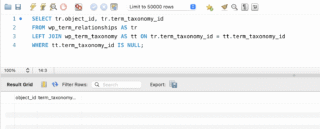
Orphaned taxonomy relationships
If your database has broken relationships (e.g., a wp_term_taxonomy entry without a valid wp_terms entry), WordPress can’t find the term and returns null.
Incorrect use of WordPress functions
This happens too. Some functions like get_the_category() or get_term_by() can return false or null if nothing is found — and code that doesn’t check that can trigger this warning.
How to fix or debug it
Add a null check before using $term->slug:
if ( ! empty( $term ) && ! is_wp_error( $term ) ) {
    echo $term->slug;
}
Verify your database integrity:
SELECT tt.term_taxonomy_id, tt.term_id
FROM wp_term_taxonomy tt
LEFT JOIN wp_terms t ON tt.term_id = t.term_id
WHERE t.term_id IS NULL;
If that returns rows, it means you have taxonomy entries that point to non-existent terms — those can cause “slug on null” warnings.
Check your custom code:
If you recently modified your theme (especially taxonomy.php, archive.php, or a custom taxonomy template), find the line mentioned in the warning and make sure the variable (e.g. $term, $category) is actually valid before accessing its properties.
Plugin conflicts:
Deactivate recently added or updated plugins that handle taxonomies — some might be mismanaging term data.
In a future post I will provide a way to detect and clean orphaned taxonomy records via an SQL query (which often cause exactly this warning).
Hope this helps.
73